
For iPhone · the essentials are free
All your money in one place
Accounts, loans and investments together. monobank transactions arrive on their own, and the budget shows how much is left until the end of the month.
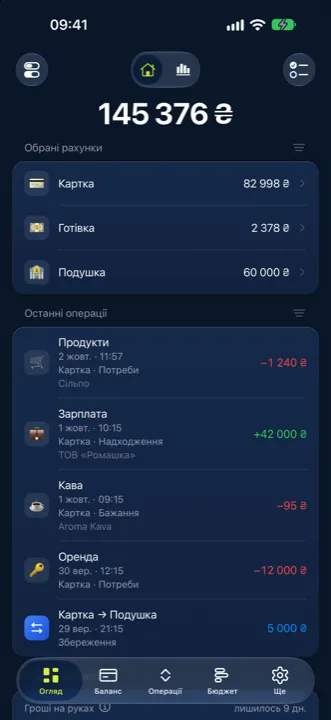
- Cash
- Cards
- Savings
- Deposits
- Government bonds
- Stocks
- ETFs
- Crypto
- Metals
- Property
- Mortgage
- Loans
- Instalments
01Tracking
Accounts, debts and assets — one balance
Statok counts everything you own and everything you owe. Net worth is one number; every part of it is its own account.
Money
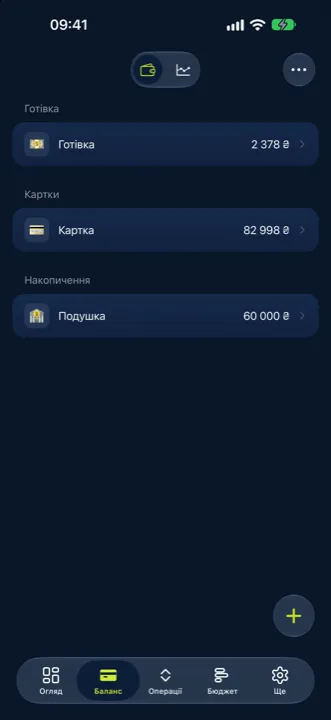
Cash, cards, bank accounts, savings — in any currency.
InvestmentsPro
Stocks, ETFs, crypto, metals, Ukrainian government bonds, deposits and property. Market prices update on their own; stocks, ETFs, crypto and metals show cost basis and gain.
LiabilitiesPro
Mortgage, credit, loan, instalment plan — with terms and a repayment schedule.
Multiple currencies
The rate is fixed on the day of the transaction, so past amounts do not drift. Rate source: NBU, PrivatBank or monobank.
02Automation
Transactions show up on their own
Less typing: the bank sends transactions, statements are read from a file, and categories fill themselves in.
monobank
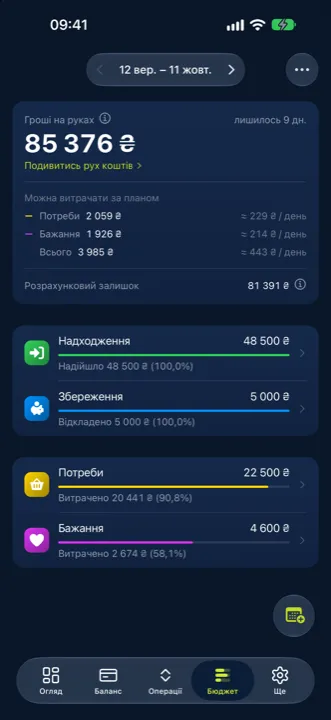
Connect your cards in the app — new transactions arrive within minutes and the balance is reconciled with the bank.
Statements from any bank
CSV, XLSX, PDF or a screenshot. Review and fix every row before saving, and undo the whole import afterwards.
Finny
The assistant picks categories and payees, reads PDFs and finds duplicates.
Rules and scheduled paymentsPro
Recurring transactions are created on schedule, and rules set the category, payee or budget for you.
03Budget
A plan for the period and an honest remainder
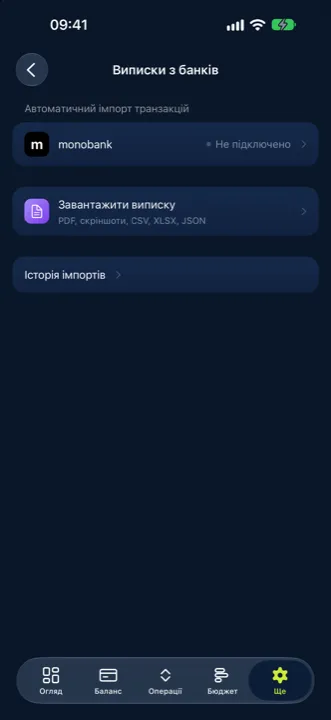
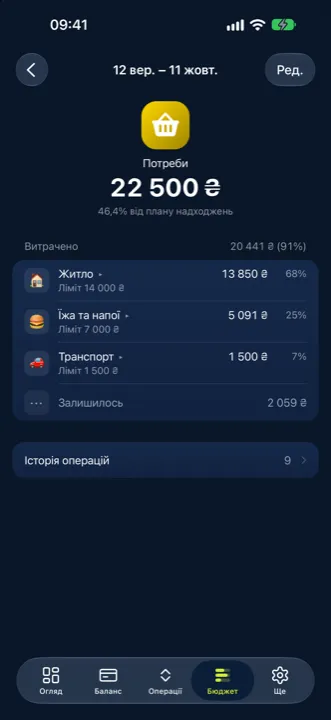
The budget runs in periods: what came in, where it is planned to go, how much is already spent and what is left on hand.
Three groups
Needs, Wants, Savings — with Income above them. Plan and actual side by side.
Money on hand
The remainder comes from the real balance of your budget accounts, not from a spreadsheet.
Outside the budget
Movement the plan did not see sits on its own line, so the bottom number matches your accounts.
Closed periods
Last month stays a snapshot: the rate and the plan do not change after the fact.
And more
Analytics
Spending and income by category and payee, a balance chart for any period.
Family accessPro
Let family members view the accounts and budget you choose.
Payees
Who and how much: history for every shop or person.
Trash and archive
Deleted items can be restored — accounts, categories, payees.
Your data stays yours
Easy to move in, and easy to leave.
Moving in
Import from MOZE or any CSV or XLSX table — columns are mapped in a wizard.
Export
All transactions as CSV. A full backup is one JSON file you can inspect before restoring.
No password
Sign in with Apple or Google. Statok has no password and stores none.
Deletion
Delete your account and all its data in the app, without emailing support.
Pricing
The essentials are free with no time limit. Pro pricing will be announced when the app launches on the App Store.
Free
$0 forever
- Accounts: cash, cards, savings
- Transactions, categories, payees
- Budget in periods
- Analytics
- monobank integration
- Statement import; Finny — a one-time allowance for recognition
- CSV export and JSON backup
Pro
Soon at the App Store launch
Everything in Free, plus:
- Investments: stocks, ETFs, crypto, metals, bonds, deposits, property
- Liabilities: mortgage, loans, instalment plans
- Scheduled payments and rules
- Family access
- Finny works in the background: categories, duplicates, recurring payments
- A monthly Finny allowance for statement import
Questions
How much does Statok cost?
The core sections — accounts, transactions, budget, analytics, monobank — are free with no time limit. Pro adds investments, liabilities, scheduled payments, rules and family access; pricing will be announced when the app launches on the App Store.
What if I do not take Pro?
The app stays on Free with no time limit. Investments and liabilities you already added do not disappear — you still see them, but new accounts of those types require Pro.
How do I connect monobank?
In the app: More → Bank statements → monobank. You link your cards to your accounts and choose how many days of history to pull. Access is read-only: accounts, balances, transactions. Statok cannot pay or transfer on your behalf. You can disconnect at any time in the same place.
I use a different bank. What now?
Upload a statement file: CSV, XLSX, PDF or a screenshot. PrivatBank has a ready-made template, other tables are mapped by column in the wizard, and PDFs and images are read by Finny.
Can I take my data with me?
Yes. Transactions export to CSV, and a full backup is a single JSON file. You can delete your account with all its data in the app.
Which devices are supported?
iPhone with iOS 15 or later.
All your money in one place
Coming soon to the App StoreFor iPhone · the essentials are free